
We may earn a commission if you sign up or purchase through our links in this article. This doesn’t add any extra cost to you—the pricing stays exactly the same.
Choosing your first email platform feels like a permanent decision: pick Mailchimp for the famous name, or GetResponse for the features you might need tomorrow?
Okay, who are they?

You can create stunning emails and newsletters, build high-converting landing pages and sales funnels, host live and on-demand webinars, set up advanced marketing automation (with AI-powered workflows), send web push notifications, and run paid ads—all in one platform. Best of all, every paid plan includes unlimited email sends, so costs stay predictable as your list grows.
User data highlights its reliability and value:
Trustpilot Score: ⭐ 4.1/5
G2 Score : ⭐ 4.3/5
Capterra Score :⭐ 4.2/5

Mailchimp is a well-known name in email marketing. Despite being a major platform, it still offers a free plan that’s perfect for beginners. This lets you test out its key tools and templates without any upfront commitment.
User data highlights its reliability and value:
Trustpilot Score: ⭐ 3.0/5
Capterra Score: ⭐ 4.5/5
G2 Score : ⭐ 4.3/5
Pricing Comparison: Why Scaling Costs Matter for Growing Businesses
One of the biggest differences that shows up in real user feedback is how each platform handles email sends and pricing as your list grows.
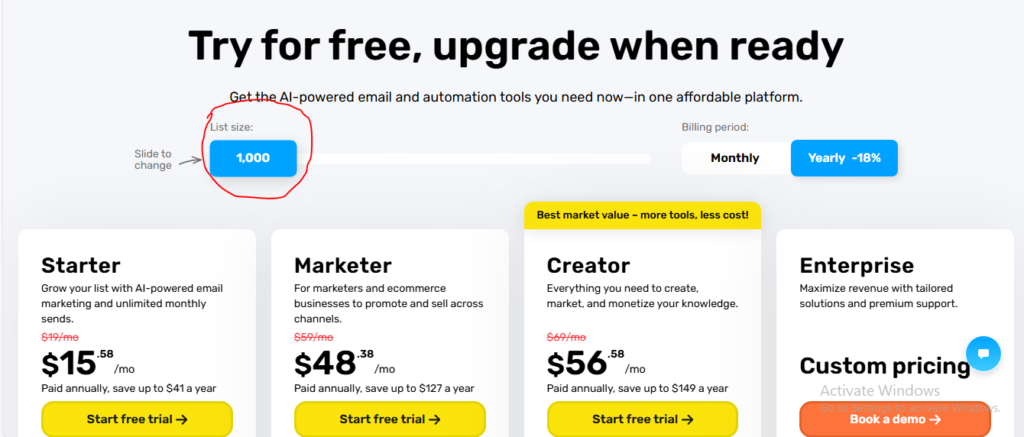
GetResponse stands out with unlimited email sends on all paid plans—no matter how many subscribers you have, you can send as many emails as you want each month without extra fees or overage charges. Their free plan supports up to 500 contacts and 2,500 emails per month, making it a solid starting point.
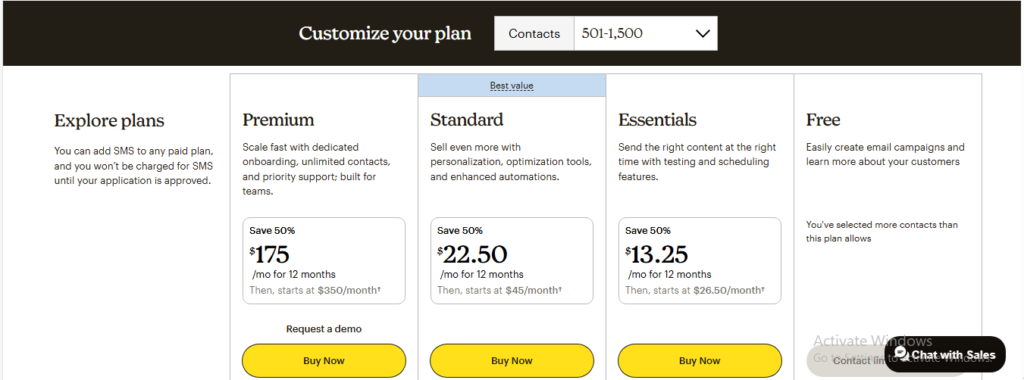
Mailchimp, on the other hand, uses a credit-based send system: you’re limited to a set number of emails per month based on your plan and contact count, and going over means additional costs. Their free plan have limitation.
Key Features Breakdown
When comparing GetResponse and Mailchimp head-to-head, the differences in features become clear—especially for businesses that want to grow beyond basic email sending.
Email Builder and Templates
Both platforms offer drag-and-drop email builders with hundreds of responsive templates.
GetResponse edges ahead with more modern designs, AI-powered subject line and content generators, and faster preview/customization options. Mailchimp’s builder is reliable and beginner-friendly but feels a bit dated and offers fewer advanced editing tools.

Marketing Automation
This is where the gap widens significantly.
GetResponse provides a powerful visual automation builder with advanced workflows, conditional logic, loops, scoring, tagging, and AI-driven campaign suggestions. You can create complex customer journeys without limits.
Mailchimp offers solid basic automations (welcome series, abandoned cart, etc.) but lacks depth—advanced branching and triggers often require workarounds or higher plans.
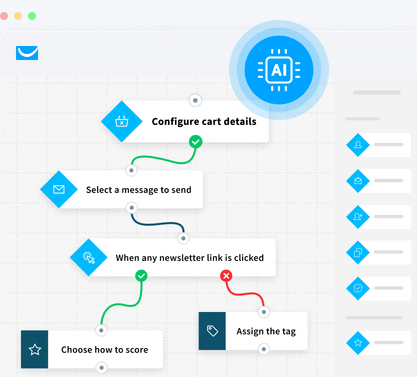
Automation strength is a common reason users switch: GetResponse gives you pro-level tools at no extra cost.

Real User Reviews from Trustpilot
Trustpilot provides a clear picture of user satisfaction, with ratings based on thousands of verified reviews.
GetResponse: ⭐ 4.1/5 (Great)
Mailchimp: ⭐ 2.9/5 (Average
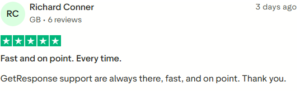
Here are real user review examples:
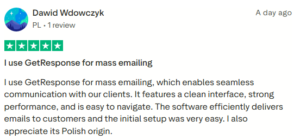
Reddit User Experiences: What Small Business Owners Say
Reddit discussions in communities like r/Emailmarketing, r/smallbusiness, and r/Entrepreneur show a mix of opinions, but a recurring theme among small business owners is frustration with Mailchimp’s pricing increases, send limits, and support issues after the Intuit acquisition.
Many users report switching to alternatives like GetResponse for better long-term value, unlimited sends, advanced automation, built-in webinars/landing pages, and more predictable scaling costs without sudden hikes.
Ratings from G2 and Capterra
Professional review sites like G2 and Capterra aggregate thousands of verified user ratings, giving a balanced view of overall performance. The scores are very close, with both platforms earning strong marks for core email marketing capabilities.
G2 Ratings:
- GetResponse: ⭐ 4.3/5
- Mailchimp : ⭐ 4.3/5
Capterra Ratings:
- GetResponse: ⭐ 4.2/5
Mailchimp : ⭐4.5/5
Deliverability and Support
Deliverability:
Both achieve strong rates (90-95% inbox placement in independent tests). Mailchimp slightly higher in raw placement, but GetResponse provides better built-in tools for list hygiene, authentication, and reputation management.
Support:
GetResponse: 24/7 live chat and email on all paid plans, with fast, helpful responses commonly reported.
Mailchimp: Email and chat available (priority on Premium), but lower plans often face longer waits and less satisfaction.
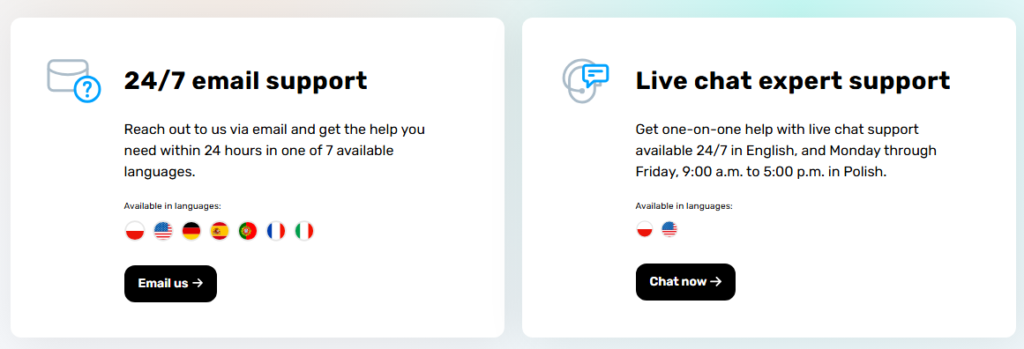
Users scaling their business typically rate GetResponse higher for responsive support and proactive deliverability features.
Who Should Choose Mailchimp? (Honest Pros)
Mailchimp is a solid, straightforward choice for:
- Solopreneurs or hobbyists sending simple newsletters without needing advanced automation, webinars, or funnels.
- Businesses already using Intuit products (QuickBooks, TurboTax) for smooth integrations.
- Large companies with big budgets that can afford Premium plans for advanced segmentation, high-volume sending, and priority support.
Its intuitive interface and reliable basic tools make it easy when your marketing needs stay simple- but it often costs more than alternatives as your list and sending volume grow.
Why GetResponse Is the Better Choice for Most Growing Businesses
Key reasons:
- Unlimited email sends on all paid plans — send as often as you want without overage fees or credits, ideal for frequent campaigns and growing lists.
- Built-in growth tools included — landing pages, sales funnels, webinars, web push notifications, and advanced automation come standard, saving you from expensive add-ons.
- Better value at scale — more predictable pricing and comprehensive features mean lower long-term costs compared to send-limited plans.
Stronger user satisfaction for scaling users — Trustpilot (4.1/5 vs. Mailchimp’s 2.9/5) and Reddit threads highlight reliable support, deliverability, and all-in-one capabilities, with many reporting successful switches from Mailchimp.
Final Verdict
Data from features, pricing, reviews (Trustpilot 4.1 vs. 2.9), Reddit feedback, G2/Capterra ratings, and deliverability shows GetResponse ahead for most growing small-to-medium businesses.
It includes unlimited sends, built-in landing pages, funnels, webinars, and advanced automation with better scalability and user satisfaction.
Mailchimp remains a big name with millions of users worldwide, offering a reliable and familiar platform—especially for basic, low-volume needs or those already in the Intuit ecosystem.
If growth is your goal, GetResponse provides more tools and value.
FAQ: GetResponse vs Mailchimp
- GetResponse vs Mailchimp: Which is more affordable as my email list grows?
GetResponse—thanks to unlimited email sends on all paid plans and no overage fees. Mailchimp’s send limits often drive up costs with higher volume.
- GetResponse vs Mailchimp: Which offers more built-in marketing tools?
GetResponse includes landing pages, sales funnels, webinars, and advanced automation at no extra cost. Mailchimp focuses mainly on email with fewer advanced tools.
- GetResponse vs Mailchimp: Which is cheaper in the long run?
GetResponse generally offers better long-term value, with predictable pricing and more features included. Mailchimp can become more expensive once you exceed send limits or need add-ons.
- GetResponse vs Mailchimp: Is it easy to switch from Mailchimp to GetResponse?
Yes—GetResponse offers free migration tools and assistance for contacts, campaigns, and automations, with many users reporting a smooth process.
- GetResponse vs Mailchimp: Which has better deliverability?
Both achieve strong inbox placement rates (typically 90-95% in independent tests). Mailchimp often edges slightly higher in raw placement, while GetResponse provides more proactive tools for list hygiene and reputation management.